
By Shannon Glennon, AI Technology Transformation Specialist, Syracuse University ITS
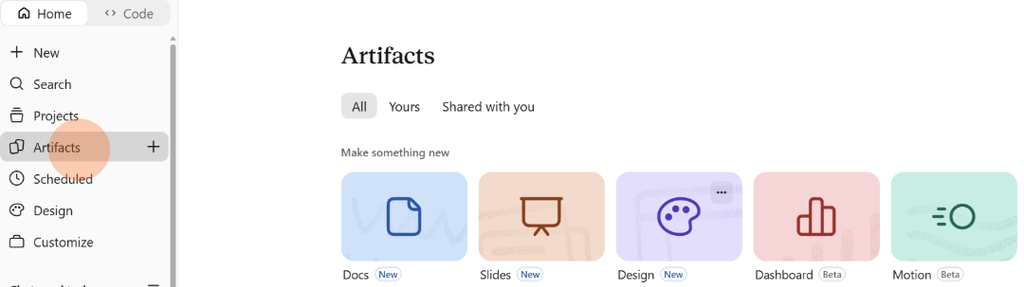
Anthropic rolled out an update to Claude’s Artifacts section on Oct. 8, and it reached everyone at SU on Oct. 23. It now has five starting points for building things, including Motion, which turns your ideas into an animated video you can download.
What’s an artifact?
An artifact is anything Claude makes for you: a document, a deck, a design, a dashboard or an animation. You can edit it, come back to it and share it with a link. Everything saves in the Artifacts tab, so there’s no digging through old chats to find it. Yours shows what you made, and Shared with you shows what coworkers sent over. Artifacts stay private until you share them.
What’s changed
With prompting, Claude could already write documents, build decks and create animations for you. Now there’s a laid out plan to walk you through it.
Five tiles, five things to try
Under Make something new, click a tile, or just describe what you want in any chat.
- Docs: “Draft a one-page project brief for the onboarding revamp that I can share with the team.”
- Slides: “Turn these meeting notes into a five-slide deck for my team meeting.”
- Design: “Design a one-page flyer for a spring workshop in SU orange and navy.”
- Dashboard: Ask questions about your connected data in plain language and get charts that stay current.
- Motion: Keep reading.
A quick look at Motion
Motion animates what you give it, like a title card that slides in or a chart that builds itself, and it’s a nice way to liven up a slide or an email.
- Click Artifacts, then click Motion.
- Try: “Animate a 30-second explainer on how to request a software install, in three steps, using SU orange and navy.”
- Ask Claude for changes or edit the text yourself, then export it as an MP4.
Work on it together
People with edit access can work in the same artifact at the same time and see each other’s changes as they happen.
- Open the artifact from the Artifacts tab and click Share.
- Add your coworkers by email or share it with your whole organization, and choose Can edit under Their access.
- Send the link. Your coworkers need to be signed in to Claude to open it.
- In a doc, select any text, add a comment and mention @Claude to have it make the change.