
This message was originally shared to all faculty and staff via email on February 5, 2026.
At a Glance
Each month, Information Technology Services provides tech tips for the Orange community. Pressed for time? Here are this edition’s topics:
This message was originally shared to all faculty and staff via email on February 5, 2026.
Each month, Information Technology Services provides tech tips for the Orange community. Pressed for time? Here are this edition’s topics:
This message was originally shared to all students via email on February 5, 2026.
Each month, Information Technology Services provides tech tips for the Orange community. Pressed for time? Here are this edition’s topics:
A phishing email with the subject line “Syracuse University General Email Account Maintenance Update Act Now…” is circulating throughout the campus community. Stay alert and reach out to the IT Security team (infosec@syr.edu) with any questions or concerns. Learn More.
Join us for our next AI at Work session, Claude Skills, to explore how generative AI can support your daily work at Syracuse. Learn practical ways to use Claude to boost productivity and streamline tasks. Feb. 11, 9:30 to 10:45 a.m. in 500 Hall of Languages or via Teams. Register.
Undergraduates working on faculty research projects have access to Syracuse University’s research computing infrastructure, including our GPU clusters for machine learning and AI workloads. If you are part of a research team, you can get an account and tap into resources like 125,000+ CPU cores and 375+ GPUs. Get Started.
PowerPoint reads slide objects such as text boxes and images in the order they were added, not their visual layout, so screen readers may jump around illogically when reading to a user. To inspect reading order, go to Review > Check Accessibility > Reading Order Pane to display all objects and reorder them logically. Office Hours.
Explore the latest in artificial intelligence with AI Insights, the newsletter for all things AI. Whether you’re looking to enhance your work with smart tools or simply stay informed, each issue brings you news from higher ed and the tech world and weekly AI tips. Newsletter.
Stay connected and ahead with Tech Tips Weekly—for quick, practical advice to make the most of campus technology. Each week, our new newsletter delivers easy-to-follow how-tos, timely service updates and insider looks at the newest features, tools and resources. Subscribe.
ITS and the campuswide information technology community are available year-round to help with your tech questions. Resources include:
Thank you for reading. Go Orange!
URGENT: Recent phishing campaigns are targeting Syracuse University community members with convincing fake warnings.
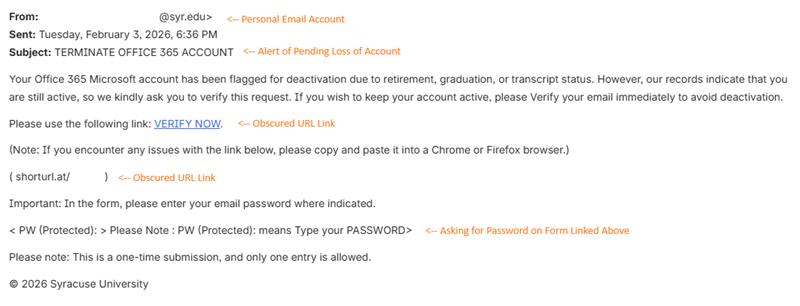
Cybercriminals are sending emails that appear to come from Syracuse University or a representative of the University, claiming your email account will be shut down unless you take immediate action. These messages are NOT from the University and are designed to steal your personal information and passwords.
Personal Email Addresses: These fake warnings come from individual email accounts; many of them from student accounts (e.g., “studentname123@syr.edu”). The University does not send official account security notices from personal accounts. Legitimate communications come from official service accounts or ITS directly.
These emails contain:
Stay vigilant and protect your digital identity. When something seems urgent or threatening, take a moment to verify before acting.
As an Adobe Creative Campus, Syracuse University offers faculty and staff access to Adobe Express, Adobe Sign and Adobe Acrobat, which offer the following features:
Beginning March 9, 2026, if you need access to the Adobe Creative Cloud, you can request it by visiting the Microsoft Access Package portal.
This message was originally shared to all faculty and staff via email on January 12, 2026.
Each month, Information Technology Services provides tech tips for the Orange community. Pressed for time? Here are this edition’s topics: